Case Study · Full-Stack Product Build / Production Deployment
Premald Homes
Building a Scalable Serviced Apartment Platform with a Custom CMS
Premald Homes is a conversion-focused serviced apartment platform built to help users browse available properties easily and make fast, low-friction inquiries through WhatsApp.
What began as a property listing website evolved into a more complete product system with a CMS-powered data layer, a custom admin dashboard, and a mobile-first frontend designed for clarity, scalability, and easier content management.
Overview
Role
Product Designer / Frontend Developer
Project Type
Serviced Apartment Platform
Scope
Frontend architecture, CMS integration, admin dashboard, responsive UX, inquiry flow, deployment
Outcome
A production-ready listing platform with scalable content management and conversion-focused user experience
Context
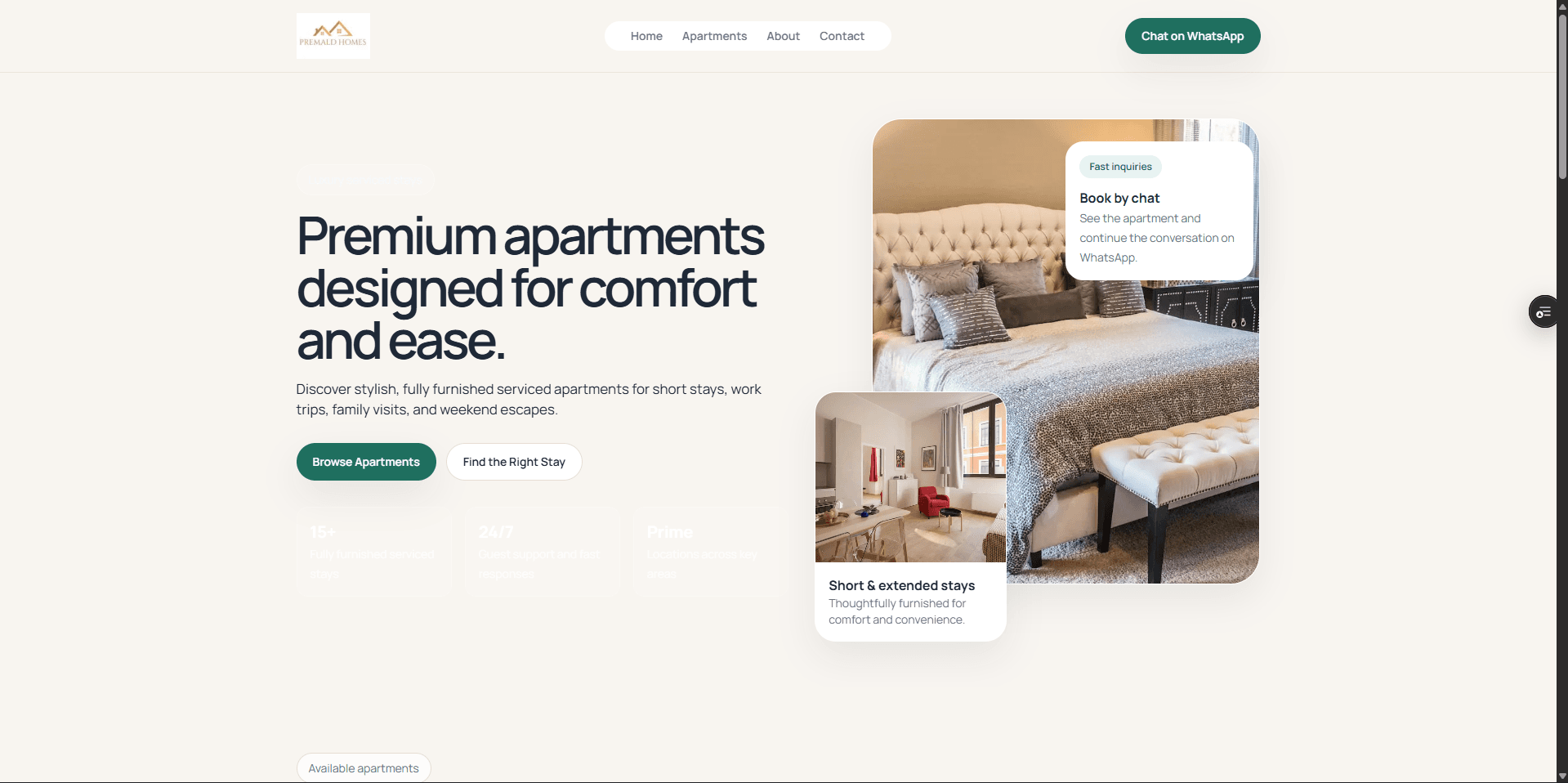
Premald Homes was built as a modern serviced apartment platform designed to make property discovery simpler for users while making listing management easier for the business behind it.
Instead of relying on a heavy external dashboard or a static marketing site, the goal was to create a system that could support both sides of the product experience: smooth browsing for users and efficient content control for administrators.
This project gradually evolved from a standard frontend build into a more complete product system with dynamic listings, a custom admin workflow, and production-ready deployment.
The Challenge
Many serviced apartment businesses face the same digital limitations: listings are difficult to manage, updates depend too heavily on developers, mobile browsing feels weak, and inquiry flows create unnecessary friction.
Premald Homes needed a more scalable and business-friendly setup, one that could support dynamic content without sacrificing speed, clarity, or conversion.
- No structured system for managing apartment listings efficiently
- Content updates risked depending on developer intervention
- Poor mobile experience could weaken browsing and inquiry flow
- A static site approach would not scale as the platform grew
- Inquiry paths needed to be simpler and more conversion-focused
During development, real engineering challenges also surfaced, including CMS data inconsistencies, type mismatches across layers, image handling issues during prerendering, and limitations in query structure.
The Solution
I designed and built a full-stack solution that combined a CMS-powered data layer, a lightweight custom admin dashboard, and a conversion-focused frontend optimized for both usability and long-term maintainability.
- Used Sanity as a flexible content backend for property data
- Built a custom mapping layer to clean and normalize CMS responses before rendering
- Created a lightweight admin dashboard for uploading, managing, and deleting listings
- Designed a responsive frontend optimized for browsing speed and clarity
- Integrated WhatsApp inquiries to reduce friction from discovery to action
The result was a platform that works not just as a polished frontend experience, but as a practical operational tool for the business.
Key Features
- Dynamic Property Listings: property data fetched from Sanity, safely transformed for the UI, and rendered through slug-based routes
- Interactive Image Gallery: upgraded from a single-image approach to multi-image display with thumbnail switching and preview behavior
- Custom Admin CMS: secure admin access with validation, listing upload, gallery image support, and property management actions
- WhatsApp Inquiry Flow: dynamic pre-filled messages tied to each property to make inquiries faster and clearer
- Mobile-First UX: improved layout responsiveness, tap targets, navigation, and visual spacing across devices
- Scalable Architecture: reusable UI components, clean folder structure, and clear separation between server and client responsibilities
Engineering Highlights
One of the most important technical decisions in this project was introducing a dedicated data mapping layer instead of sending raw CMS data directly into the UI.
- Normalized data before rendering
- Handled optional and inconsistent CMS fields safely
- Built image URLs in a controlled way
- Reduced the chance of UI crashes caused by malformed content
This helped make the frontend more stable and maintainable, especially as content structure changed during development.
I also solved several real-world implementation issues:
- Fixed GROQ alias errors by restructuring queries
- Handled image undefined crashes through defensive mapping and fallbacks
- Separated admin and public data models to avoid type mismatches
- Split query logic by use case to reduce inconsistencies in returned shapes
Performance was also kept in focus through static rendering, image optimization, limited gallery payloads, and a lightweight component structure.
Deployment & Production
The project was deployed to production on Vercel and connected to a custom domain, turning the build from a working local product into a fully accessible live platform.
- Configured environment variables securely for production
- Connected and validated the custom domain setup
- Debugged incorrect DNS records and propagation-related issues
- Resolved SSL and domain accessibility concerns during launch
These steps were important because they moved the project beyond implementation and into real delivery, where users could access the platform reliably.
Results / Impact
The final product delivered value across operations, user experience, conversion, and long-term maintainability.
- Non-technical users can now manage listings through a custom admin workflow
- Users can browse properties more clearly through a structured and responsive interface
- The image gallery improves property presentation and browsing confidence
- WhatsApp integration reduces friction between discovery and inquiry
- The codebase is better structured for future updates and platform growth
- The system was successfully deployed as a live, production-ready platform
Key Takeaways
- Strengthened my ability to build scalable systems instead of static pages
- Reinforced the importance of designing for conversion, not just aesthetics
- Improved my confidence in handling real-world production and deployment issues
- Deepened my product thinking across content management, user flow, and business usability